
TL;DR — 3 lines
- Right now: the cap is per person — a groupmate logs the rest with you marked as payer (Splitwise officially suggests this).
- The real fix: switch to a splitter with no caps from today — a browser tool nobody has to install, or an app like Tricount or Splid. Don't migrate anything; settle old balances in Splitwise as-is.
- Only if you want to stay: Pro removes the cap and starts with a 7-day free trial. The price is not the same everywhere — the in-app offer on my Japanese account showed ¥6,000/year (¥500/month) in August 2026, while public reports put the US at $49.99/year and India at Rs 999/year. Splitwise's own terms say the price varies by country, date and promotion, so check your in-app price before you commit — and mind the auto-renewal.
(Transparency note: I'm an app developer who builds FAMI-KAN, a free browser-based bill splitter — and a Splitwise user who has personally hit this limit. Everything below about Splitwise comes from my own paid-nothing, free-account test in August 2026, plus Splitwise's official help pages. I have since hands-on tested Tricount and Splid as well — see my full four-app comparison.)
You're mid-trip, standing at the register, and Splitwise just told you to wait until tomorrow. Skip the backstory — here are the three fixes, fastest first.
Fix 1 (10 seconds): Ask a groupmate to log it — the limit is per person
Splitwise's daily cap applies to each user, not to the group. This isn't a hack; Splitwise's own help page suggests it.
- Anyone in your group who hasn't hit their own limit opens the group.
- They tap Add expense and enter the amount.
- In the "Paid by" line, they tap and select you as the payer.
The record lands in the same group, with you correctly marked as the person who paid. In a group of four, you effectively have four times the daily allowance. For most trips, this one fix ends the problem.
Fix 2 (the real fix): Switch from today — and don't migrate anything
Fix 1 gets you through today. But if the cap bit you once, it will bite you again tomorrow. The realistic move is not a clever workaround — it's switching to a tool without caps, starting with the next expense.
The part people overthink: you don't need to move your history. Whatever is already in Splitwise, settle there as-is when the trip ends. From today's expenses onward, log in the new tool. Two settlements instead of one — that's the entire cost of switching mid-trip.
Your options fall into two types:
- Browser tools (no install, no accounts) — the organizer creates a room and shares a URL; everyone views it in a browser. This is the lowest-friction option when your group includes people who will never install another app (parents, kids' grandparents…).
- Apps (Tricount, Splid) — full-featured replacements with no daily caps, if your group doesn't mind installing one more app.
Three concrete options, honestly labeled:
| Daily entry limit | Account needed | Family/weighted splits | Hands-on tested by me | |
|---|---|---|---|---|
| FAMI-KAN (browser) | None | No — share a URL | Yes — households as one unit, per-age weighting | Yes (I build it) |
| Tricount (app/web) | None | Optional | Basic shares | Yes — tested Aug 2026 |
| Splid (app) | None | Optional | Basic shares | Yes — tested Aug 2026 |
Fix 3 (only if you want to stay on Splitwise): Pro, with eyes open
I won't pretend this is my recommendation — I build a competing tool. But in fairness: if your group's history and habits are deeply settled in Splitwise, paying for Pro removes the cap, and the very interstitial that blocks you offers a 7-day free trial ("ad-free and unlimited expense entry" — verified in my August 2026 test). Two honest warnings: the trial rolls into a paid subscription if you forget to cancel, and you'd be paying to restore behavior that used to be free.
What actually happens when you hit the limit (my August 2026 test)
- There is no single number — and that is the real finding. Splitwise confirms a daily cap exists on free accounts but does not publish the figure. Splitwise support has described it as "up to 3 per day" (December 2023). In my own test on a Japanese account in August 2026, the cap was 2 — the third entry triggered the Pro screen. Public reviews land elsewhere again: 3 (UK, Denmark, Taiwan), 4 (US, Italy, Australia, Belgium), even 5 (US). The open-source Spliit team, writing independently, puts it at 3–4 and dates the cap to December 2023. Treat any single figure you read — including mine — as one account on one day.
- In my test, adding expenses triggered a full-screen Pro promotion with a 9-second countdown ("continuing in 9 seconds…") before I could proceed. It's not a third-party video ad — it's Splitwise's own upsell screen, and its wording ("ad-free, unlimited entries") confirms what the free tier holds back.
- On earlier real trips, I did get locked out of adding more expenses for the day. The cap resets daily.
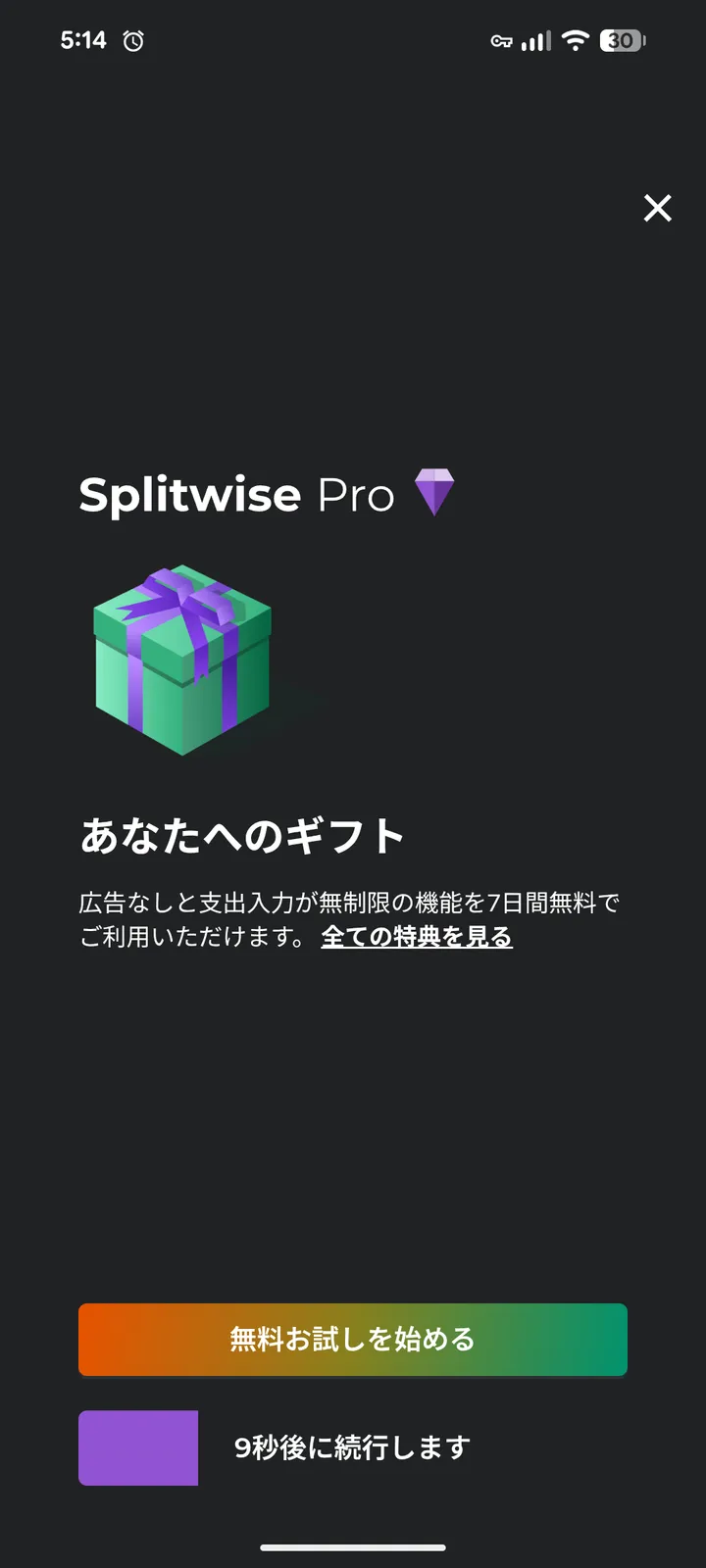
The actual screen from my test (August 2026): a 7-day Pro trial offer with "continuing in 9 seconds…" — not a third-party video ad.
The mixed-households problem (the part no app fully solves)
The night I decided to build my own tool wasn't on a trip. It was a New Year's gathering with old friends — all of us now parents. I'd covered most of the bills, and when I opened the settlement, the app listed "Family A – husband," "Family A – wife," me, my wife… every adult as a separate line. Nobody charges the kids, obviously. But the tally was an endless string of individual additions for what was really a three-family dinner.
And the ratio question is where groups quietly fracture. Should a family of five pay the same as a couple? Here's the uncomfortable pattern I've watched over years of gatherings: the families who had kids first benefit early — everyone's generous while there's one toddler — and then push for equal splits once their kids outnumber yours. If you think this is a Japanese quirk, it isn't: the same fight fills family-travel forums and makes national news out of Reddit threads in the English-speaking world.
To be fair, Splitwise has thought about this: its "shares" split explicitly suggests "3 families → 3 shares" (screenshot below, from my test — the Japanese UI reads exactly that). But here's the catch I confirmed while testing the free tier: there is no saved ratio. You re-assign those shares by hand on every single expense — dinner, gas, groceries, again and again. Saving a default split for a group ("set it and forget it") is a Pro-only feature.

Splitwise's "split by shares" screen (my test, August 2026): it explicitly mentions multi-family splitting — and the share fields you fill in by hand, per expense.
I wanted the family to be the unit, not the workaround. So in FAMI-KAN you register "the Tanaka family" once, set its headcount — adults ×1.0, teens ×0.8, elementary schoolers ×0.5, preschoolers ×0 (presets you can change) — and both the math and the final settlement stay at the household level. One family, one balance, one payment. The ratio argument doesn't disappear, but it becomes one visible number the group agreed on, instead of a silent grudge.
Which fix is yours
- Standing at the register right now → Fix 1. Hand your phone to a friend.
- This will happen again (any trip, any group) → Fix 2. Switch from the next expense; settle the old balance in Splitwise as-is.
- Group won't install anything → the browser-tool route inside Fix 2.
- Deeply invested in Splitwise and fine paying → Fix 3, with the auto-renewal warning.
- Multiple families in one group → a tool where a household is a first-class unit — or Splitwise's shares tab, re-assigned per expense (free) / saved as default (Pro).