
TL;DR — 3 lines
- Quick verdict: Splitwise still has the clearest UI of the four — but its free daily entry cap hurts. Tricount is the most pleasant for equal splits. Settle Up is the only app that saves your ratios (great for roommates).
- What no comparison mentions: none of the four — not even Settle Up — treats a family as one unit with kids in the headcount. Equal splitters won't care; multi-family groups will.
- If your group won't install anything: a browser tool shared as a URL (including ours) does the same job with zero setup.
(Transparency note: I build FAMI-KAN, a free browser-based bill splitter — read my conclusions with that in mind. I hands-on tested Splitwise, Tricount, Splid, and Settle Up on real free accounts in August 2026, with screen recordings. Where something comes from official docs instead of my own screen, I mark it with †.)
The answers you actually came for
The questions below are the ones real users ask — not spec-sheet lines. Every cell is from my own testing unless marked †(official docs).
| Your question | Splitwise (free) | Tricount | Splid | Settle Up | FAMI-KAN (browser) |
|---|---|---|---|---|---|
| How easy is adding members? | Everyone needs an account | Type names; adding later is hard to find | Type names, no signup | Type names, no signup | Type names; setting ratios adds one step |
| Will it cap my entries? | Yes — varies (2–5) | No | No | No | No |
| Do I see each person's share as I type? | No | Yes — best-in-class | Partial | Yes | Yes |
| Are my ratios remembered next time? | Pro only | No — re-choose each expense | No — resets to equal | Yes ("Default share") | Yes — set once |
| Can a family count as one unit? | No | No | No | No | Yes |
| Can one bill have two payers? (dinner paid half by A, half by B) | No | No | Yes | Yes | No |
| Fewest-transfers settlement? | Yes | Yes† | Yes | Yes† | Yes |
| Can I record a partial repayment? | Yes | Yes† | Yes† | Yes | Yes |
| Can I export (PDF/Excel/CSV)? | CSV† | Removed in 2024† | Yes — PDF/Excel | Yes — CSV/Excel | No |
| Calculator in the amount field? | Web version only† | Yes (iOS)† | Unknown | Yes† | Yes (on entry) |
| Receipt photos or scanning? | Attach free; OCR scan is Pro† | Attach free† | Unknown | Photo attach — Premium† | No |
| Can I pay straight from the app? | Venmo/PayPal — US only† | Unclear (bunq features)† | No | Bank-app link — Central Europe only† | No |
| How do I share it with the group? | Everyone installs + signs up | Link (I struggled to find it) | Code + link | Link + QR; browser viewing | URL only — nobody installs anything |
| Can I see why my amount is what it is? | Decent | Decent | Decent | Weak — the number appears without its reasoning | Itemized view built for this |
| Hands-on tested by me | Yes | Yes | Yes | Yes | Yes (I build it) |
One note for readers in Japan: none of the five — ours included — connects to PayPay or LINE Pay. Wherever you are, the actual money always moves outside these apps.
Tricount: the most pleasant entry experience
The moment I typed a total, Tricount showed who owes what, per person, updating live. You catch mistakes before saving, not after.
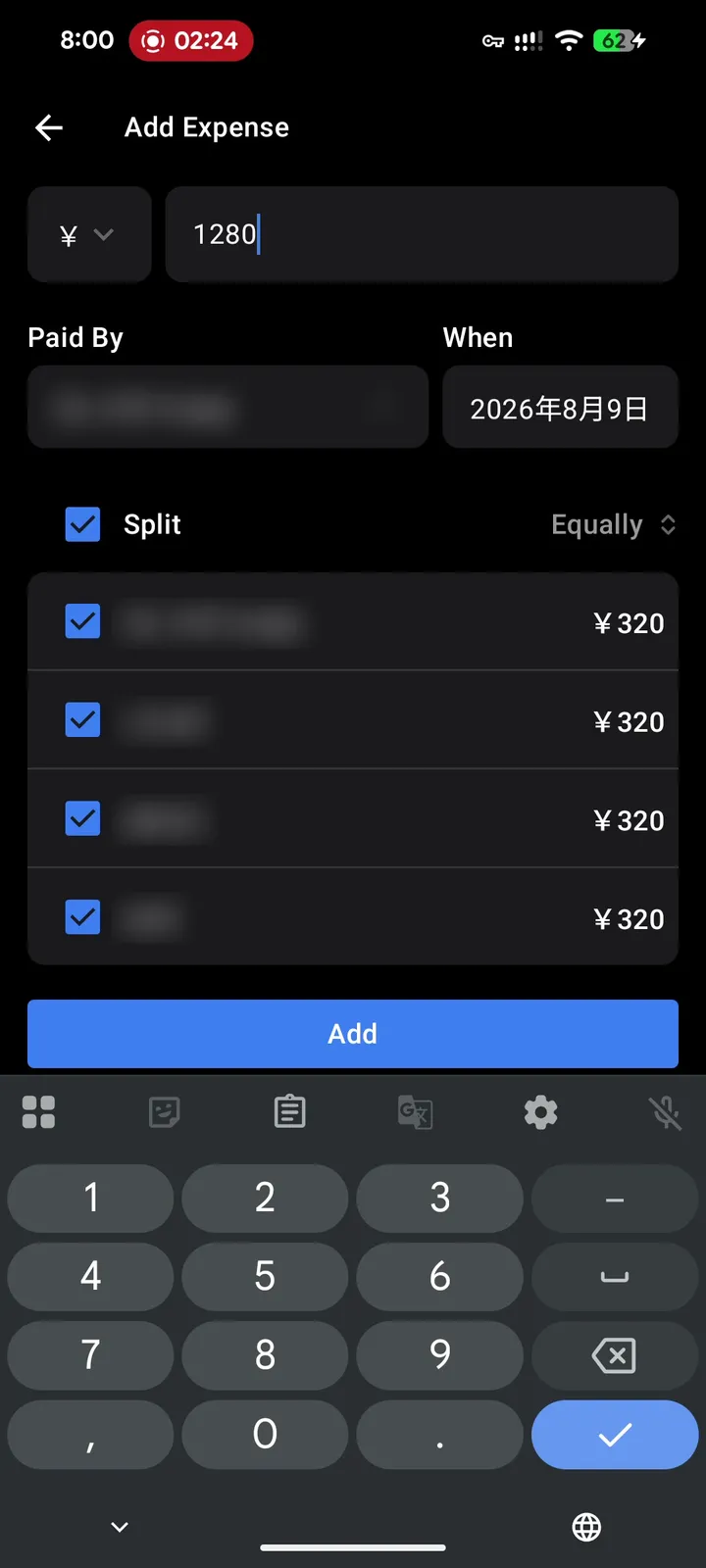
My test, August 2026: type ¥1,280 and every member's ¥320 share appears before you hit Add. (Names blurred.)
Two honest gripes from my test. First, each expense makes you re-choose the split method (Equally / As Parts / As Amounts) — nothing carries over. Second, I genuinely struggled to find where to add members later and how to share the group. To be fair, link sharing with instant sync for everyone officially exists (official FAQ); my struggle was discoverability, not absence. Accounts are optional for the basics. One more heads-up: the PDF/Excel export that reviewers used to praise was removed in 2024 after the bunq acquisition — as was the Japanese UI.
Splid: more powerful than its reputation, same ratio problem
Splid surprised me: four split modes (equal, percentage, shares, exact amounts with an auto-calculated remainder), multiple payers on one expense, and PDF/Excel export — genuinely useful for a trip treasurer. Group creation worked without any signup in my test, though the UI was English-only.
The catch: on my second expense, the split had reset to equal. Whatever ratio you carefully set applies to that expense only.
Settle Up: the one that actually saves your ratios
Credit where it's due: Settle Up has a per-member "Default share" setting saved in the group — I confirmed the ratio-fix works in my test. Set a roommate's share once and it sticks for future expenses, which is exactly what recurring households want.
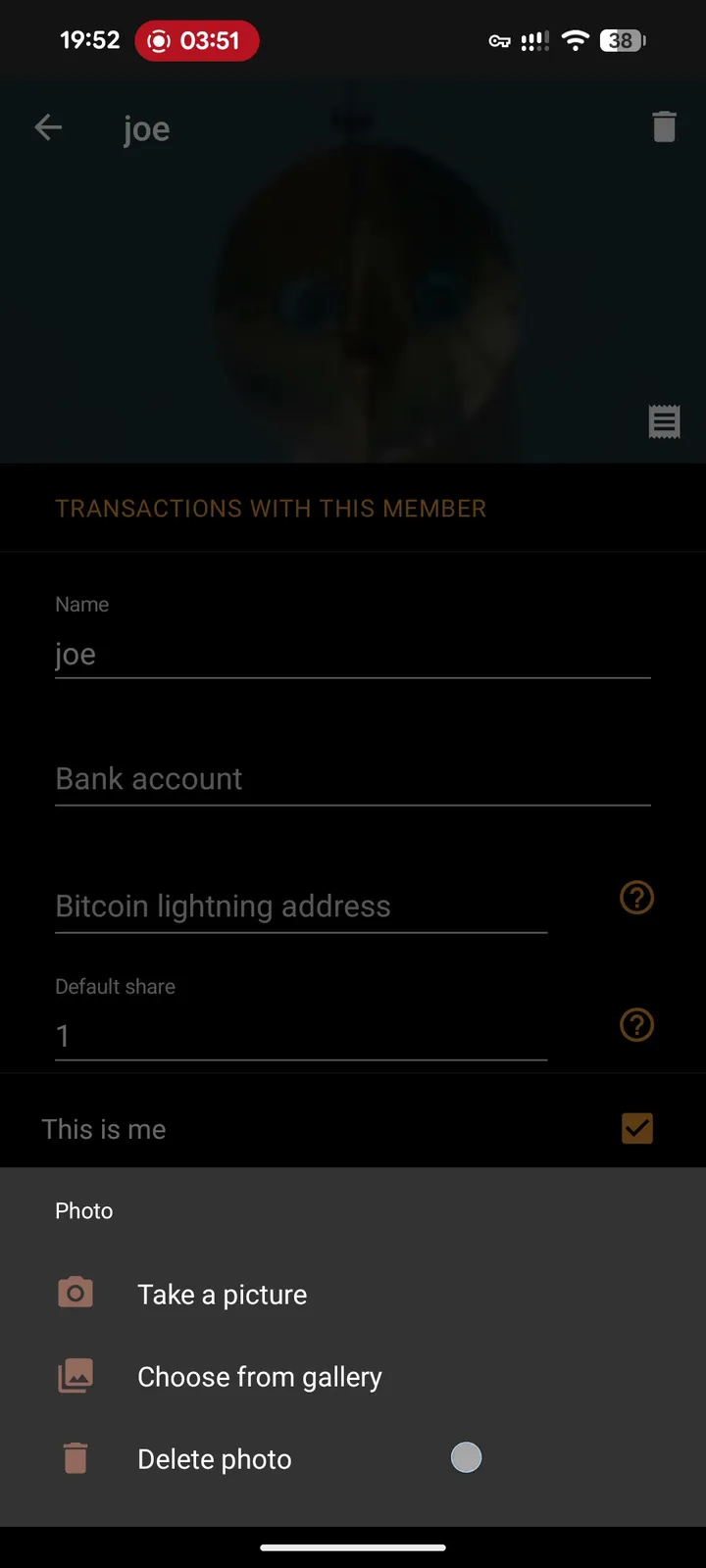
Settle Up's member screen (my test): "Default share" is saved per member — the field the other apps don't have.
Two honest gripes here too. When someone joins via a shared link, it's hard for them to see why their amount is what it is — the reasoning behind the number isn't one-glance visible. And the balance bubbles at the top of the group screen confused me: I couldn't tell whether a big bubble meant "owes a lot" or "paid a lot".
Splitwise: the clearest UI, undercut by the cap
Let me be fair to the market leader: after testing all four, Splitwise's UI is still the easiest to understand — screens explain themselves in a way the others don't quite match. Which makes the frustration sharper: the free tier's daily entry cap — not a fixed number; our own test hit it at 2 — lands exactly when you need it most (mid-trip), and saving a default split is Pro-only. I've written a full, tested guide for the moment you hit it: Hit Splitwise's daily limit mid-trip? 3 fixes that work right now.
The ratio thing, honestly — a three-step ladder
Here's the truth most comparisons skip, including my own bias as a developer: most groups split equally and will never care about any of this. If that's you, pick Tricount and stop reading.
One step up: groups with stable, adult ratios — roommates at 60/40, a couple splitting by income. Settle Up's saved Default share handles this well; nothing else in the app pack does without paying.
Top step: families. A three-family barbecue where nobody charges the preschoolers, the grade-schoolers count as half, and each household wants one balance instead of "Family A – husband, Family A – wife". In my testing, no app on this page models that — Settle Up saves per-person weights, but a family as a unit with its own headcount simply isn't a concept anywhere. That's the specific gap I built FAMI-KAN around: register "the Tanaka family" once, set its composition (adults ×1.0, teens ×0.8, elementary schoolers ×0.5, preschoolers ×0 — editable presets), and every expense and the final settlement stay at the household level.
One more place the ladder bites, for readers visiting Japan: an izakaya bill. Nobody orders their own dish — the table shares dozens of small plates, and the bill arrives as one undifferentiated total. Alcohol is the expensive part, so a local organizer (the kanji) won't split 24,600 JPY evenly between two people who drank five beers each and two who drank oolong tea; the norm is a weighted warikan — non-drinkers at ×1.0, drinkers at around ×1.4 — with a latecomer who joined halfway at roughly half. Tricount and Splitwise both make you type those amounts out per expense; Settle Up's saved shares get closer; a ratio-first tool just asks for the weights once.
Where FAMI-KAN honestly stands
The trade-offs, plainly: our ratio model makes initial member setup more involved than Tricount's "just type names" flow — overhead you don't need if you'll never use weights. English readers may find our screens more text-heavy than the apps above. We have no export and no receipt photos today. In exchange: no installation for anyone (share a URL, everyone opens a browser), ratios that persist once set, a family as a first-class unit, and a settlement view built to answer "why is my amount this?" after the fact.
Which one is yours
- Equal splits, group happy to install an app → Tricount. The live preview alone is worth it.
- Roommates or a couple with fixed ratios → Settle Up. The saved Default share is the feature the others don't have.
- A treasurer who needs exports and multi-payer records → Splid.
- Already on Splitwise and fine paying for Pro → Pro solves the cap and saves default splits. Splitwise's terms note the price varies by country and promotion, so check the in-app price.
- Nobody wants to install anything → a browser tool via URL — that's the gap we built FAMI-KAN for.
- Multiple families, kids in the headcount → no app here models it; that's exactly our corner.